Stop digging through folders.
Your samples, already sorted.
Point Samplr at your sample folders and every kick, snare and hat is filed where you expect it. Pick the sounds you want, press K, and export a named pack in minutes. Then send the kit to a friend.
- SortedKicks with kicks, hats with hats, without renaming a single file.
- PackedYour picks become a named pack that loads as an Ableton Drum Rack.
- SharedSend a kit to a friend by username, with every edit and its pattern.
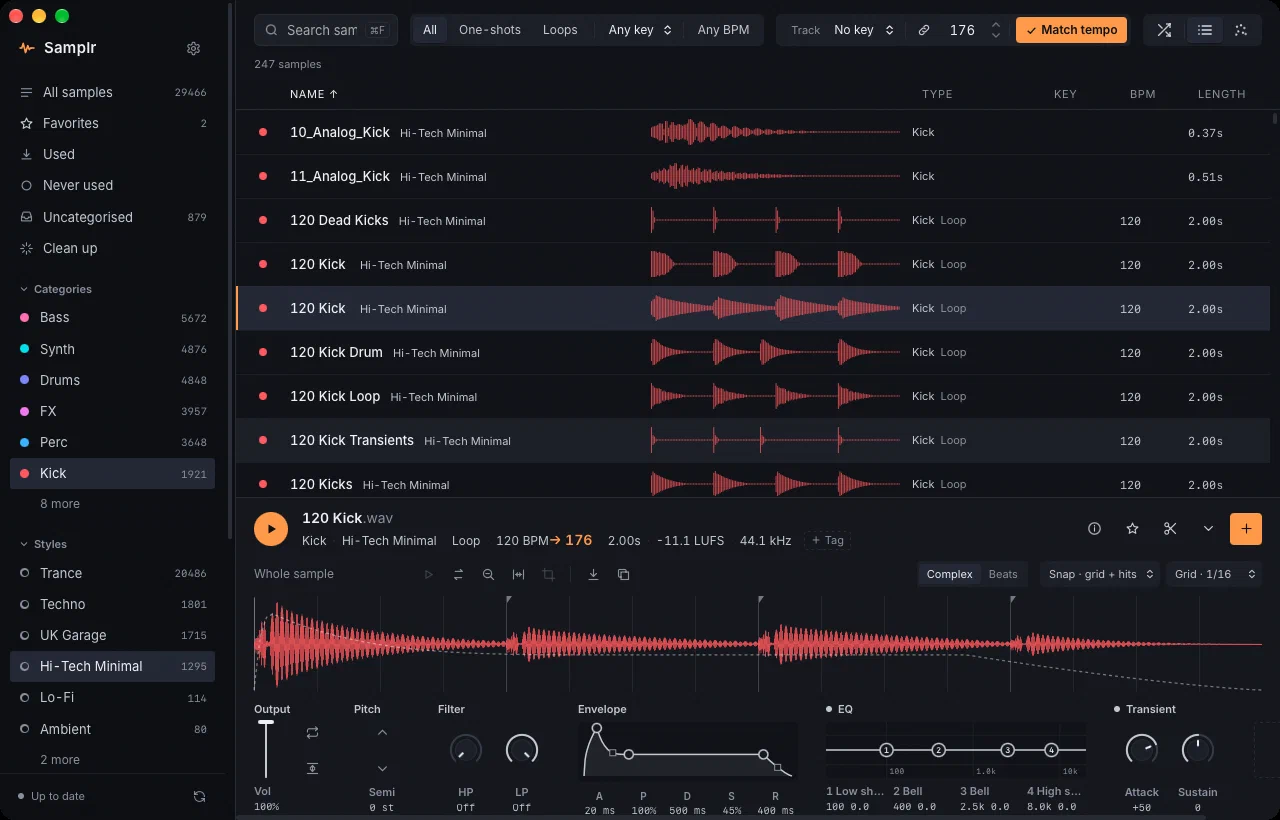
From a folder of files to a pack in your DAW.
- Add your foldersDrop them on the window. Samplr analyses every file once in the background and watches for new ones.
- Find the soundSearch, filter by key and tempo, ask for sounds like this one, or walk the map.
- Hear it in your trackPreviews play in your track's key and tempo, at the same loudness as each other.
- Shape itCut, pitch, warp, filter, envelope and effects, on the waveform.
- Keep itPress
K. The sound joins the kit exactly as you hear it. - Use itDrag it into the DAW, export the kit as a pack, or send it to a friend.
Sorted before you open a folder.
Pack authors name their sounds on purpose, so Samplr reads the file and folder names first. For the files whose names say nothing, it listens.
- 60,000
- labelled samples the classifier was trained and tested on
- 43
- measurements of each sound: band energies, attack, decay, MFCCs
- 14
- categories, from Kick and Hi-hat to Pad and Vocal
- 84%
- right when it answers, and it only answers when 85% sure
It is a gradient-boosted decision-tree classifier, and it runs on your machine: no sample is uploaded. What it will not guess waits in a review queue you clear with the number keys.
It learns from you
Correct a category and the samples that sound like it follow. Your correction is never overwritten.
Key you can trust
Exact on half of 1,500 test samples, against 44% for Essentia and 34% for libKeyFinder. When unsure it gives no key instead of a wrong one.
Find similar
Pick a snare and the list reorders by how close everything else sounds to it.
Match key and tempo
Previews transpose to your track's key and stretch to its tempo. The tempo follows your DAW over Ableton Link.
Used and never used
See what you have already dragged out, exported or put in a kit, and what you have never touched.
See your whole library at once.
Every sample is a dot, and sounds that are alike sit together. Hover to hear one. Kicks gather in one corner, pads in another, and the odd sound you forgot you had sits between them.
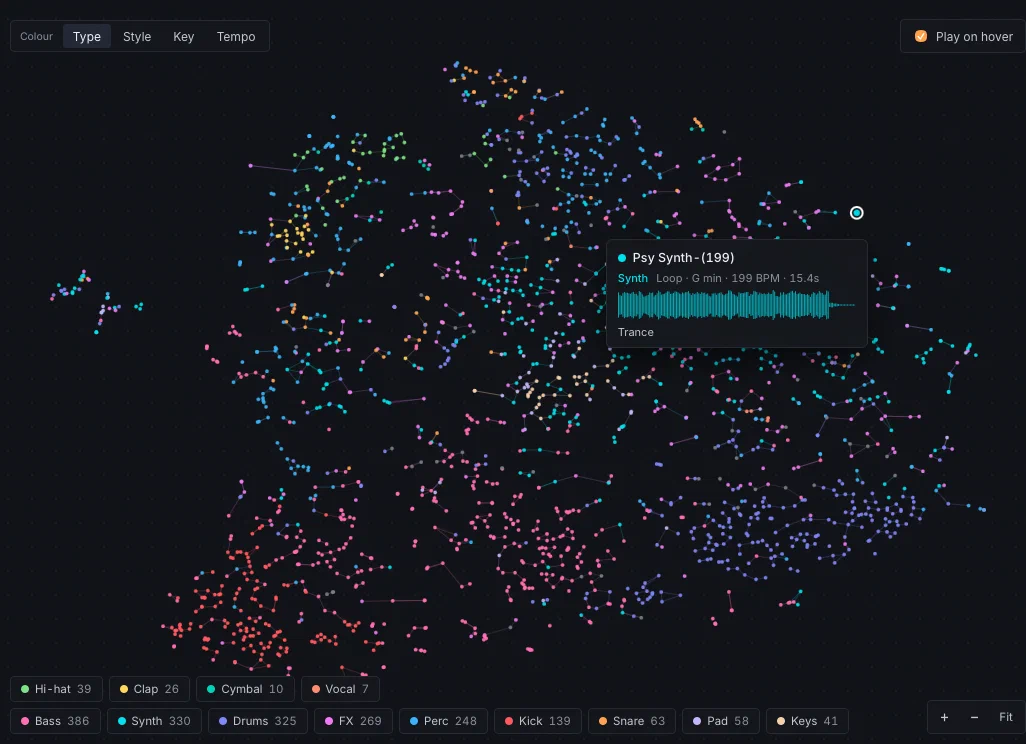
Play on hover
Move across a cluster and hear how it changes from one edge to the other.
Walk to neighbours
The arrow keys step to the closest sound in that direction.
Select a region
Shift-drag around a group of dots and work with those samples only.
Show similar
From any sample in the list, jump to where it lives on the map.
A pack in minutes, ready to load.
Press K and the sound joins the kit as you hear it. Export writes a named pack such as Drum Hits/Kicks/ND_Kick_01.wav, with an Ableton Live Drum Rack and a Bitwig Studio multisample beside it.
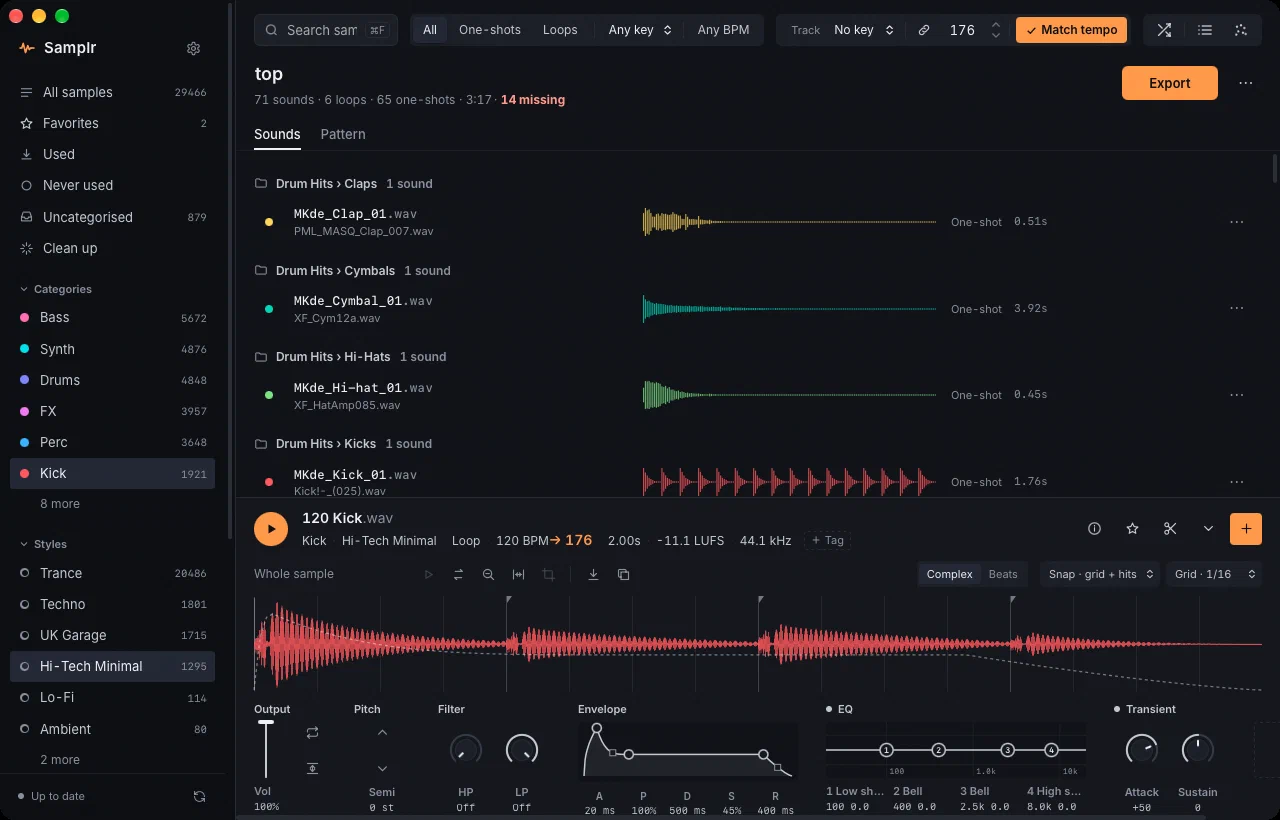
One pad per sound
The Drum Rack and the multisample map every sound from C1, in the kit's order.
What is missing
Ask a kit which drum sounds it lacks and it suggests the closest ones in your library.
Variations
Four takes on a sound in one step: a semitone up and down, brighter and darker.
Level in one click
Normalize every one-shot of a kit so they all peak alike.
Find what is wasting your disk.
Years of packs leave the same file in five places. Samplr lists them by content, lets you pick the copy to keep, and hides or trashes the rest when you say so.
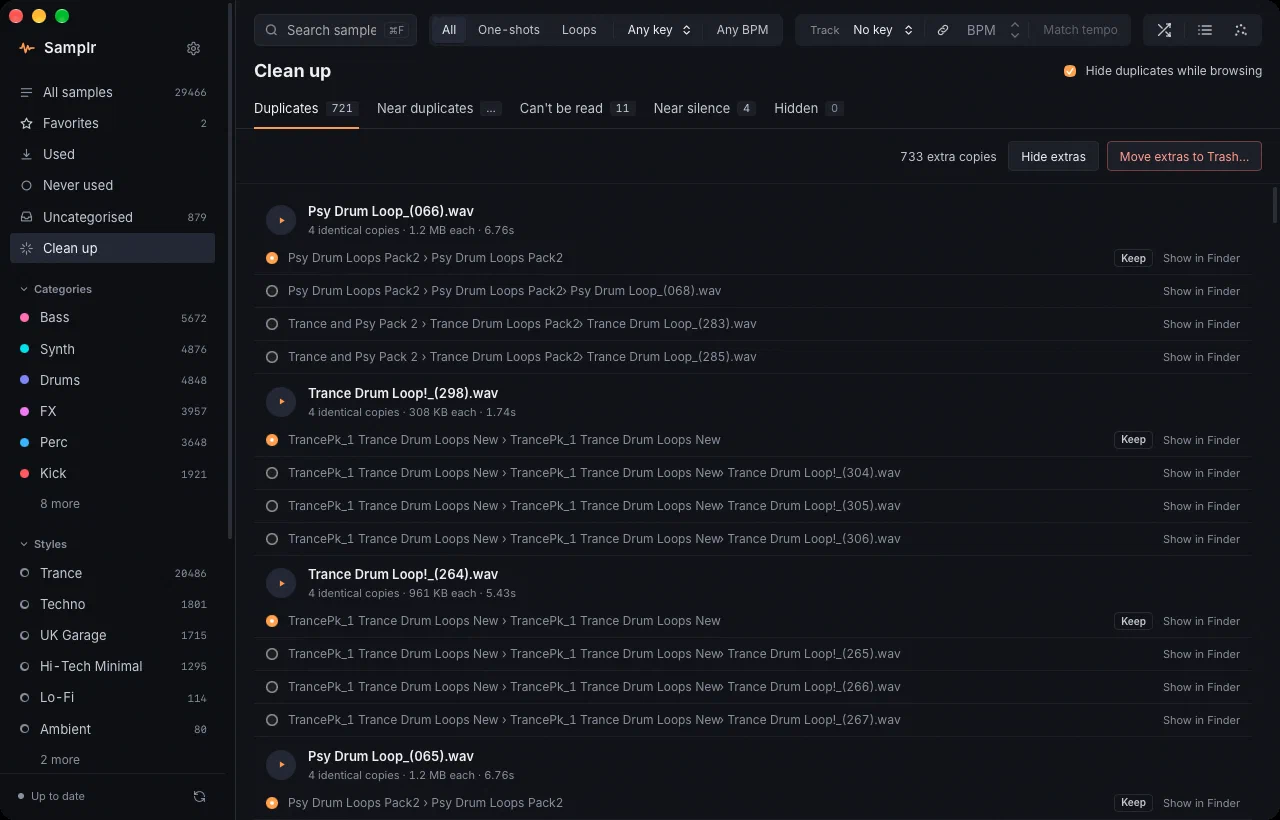
Identical files
Matched by what is in them, whatever they are called.
Near-duplicates
The same sound re-exported under another name or sample rate.
Unreadable and silent
Damaged files and empty renders, in their own lists.
Nothing is deleted for you
You choose per group. Hidden files stay on disk and come back with one click.
Edit on the waveform. Export what you hear.
Select a part, pitch it, warp it, filter it. What leaves the app is that render, as a WAV: drag the row, the selection or the whole waveform into your DAW.
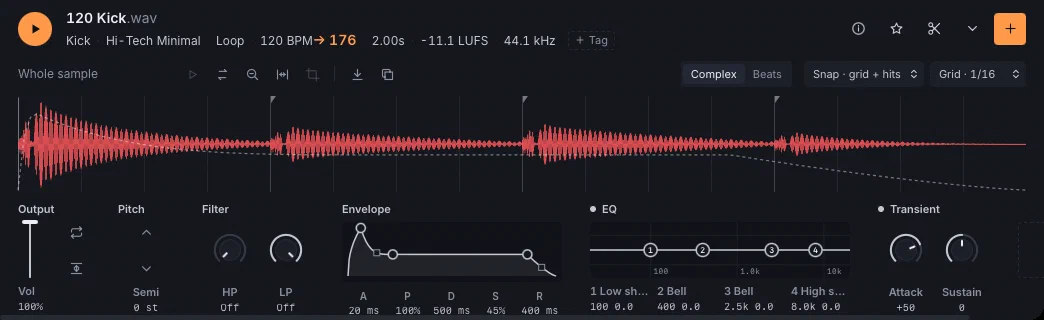
Warp like Ableton
Drag transient markers. Complex keeps the pitch; Beats moves slices without stretching.
Envelope with curves
Attack, peak, decay, sustain and release on a graph, and each segment bends.
Nine effects
EQ, Delay synced to the tempo, Reverb, Drive, Bitcrush, Compressor, Transient, Width and Gate.
Slice
Cut a loop at its transients into a kit, straight onto the pattern's steps, or split it into low, mid and high.
Layers
Play up to three other samples with the current one, then keep the sum as one new sound.
MIDI keyboard
Any connected keyboard plays the current sample chromatically.
Hear the kit as a groove before it reaches the DAW.
A step sequencer over the kit's one-shots. Build the beat, then drag it out as MIDI onto the same pads as the exported Drum Rack, or as an audio loop.
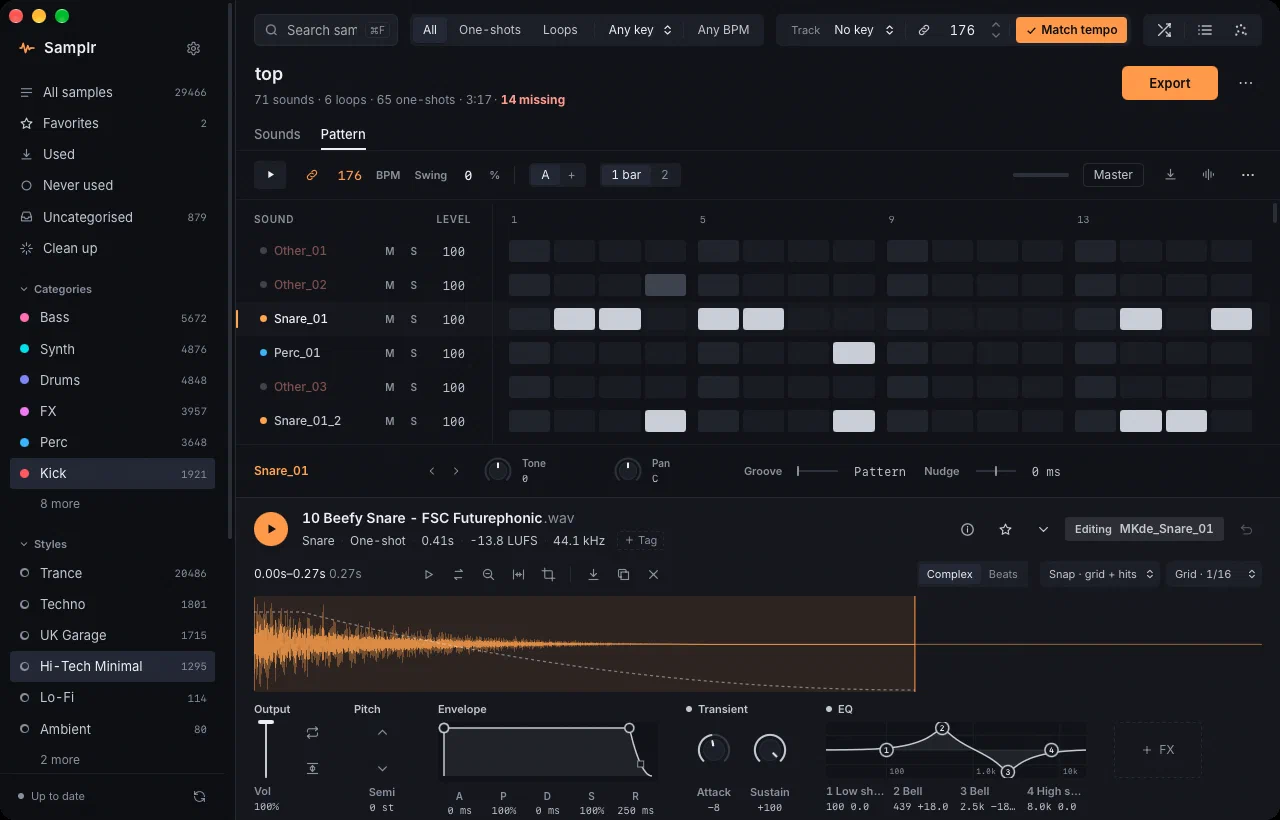
Eight patterns, chained
A to H play in the order you drag them into.
Per step
Velocity from 1 to 127, repeats for 1/32 and triplets, and a chance of 25, 50 or 75%.
Per lane
Its own length for polymeter, its own swing, and a nudge early or late.
Follows the DAW
With Ableton Link on, your DAW's play and stop start and stop the pattern, on the bar.
Undo everywhere
⌘Z takes back the last thing you did in the pattern, the kit or the library.
The sheet.
| Runs on | macOS (Apple Silicon and Intel) and Windows 10 or later, 64-bit |
|---|---|
| Works with | Any DAW that takes a dropped WAV or MIDI file. Kit presets for Ableton Live and Bitwig Studio. |
| Tempo sync | Ableton Link: tempo and transport |
| Exports | WAV at 16, 24 or 32 bit · Standard MIDI File · .adg Drum Rack · .multisample |
| Analysis | Tempo, key, loudness in LUFS, peak in dBFS, category, style, 43 timbre features. Done once per file, on your machine. |
| Your files | Stay where they are. Samplr watches your folders and never moves or uploads a sample. |
| Built with | Tauri and Svelte · Signalsmith Stretch · Ableton Link · Symphonia |
Samplr is in beta.
Install it, sign in with your email and request access from the app. Beta licences are granted by hand.
The installers are not code-signed yet. On Windows choose More info, then Run anyway; on macOS right-click the app and choose Open.